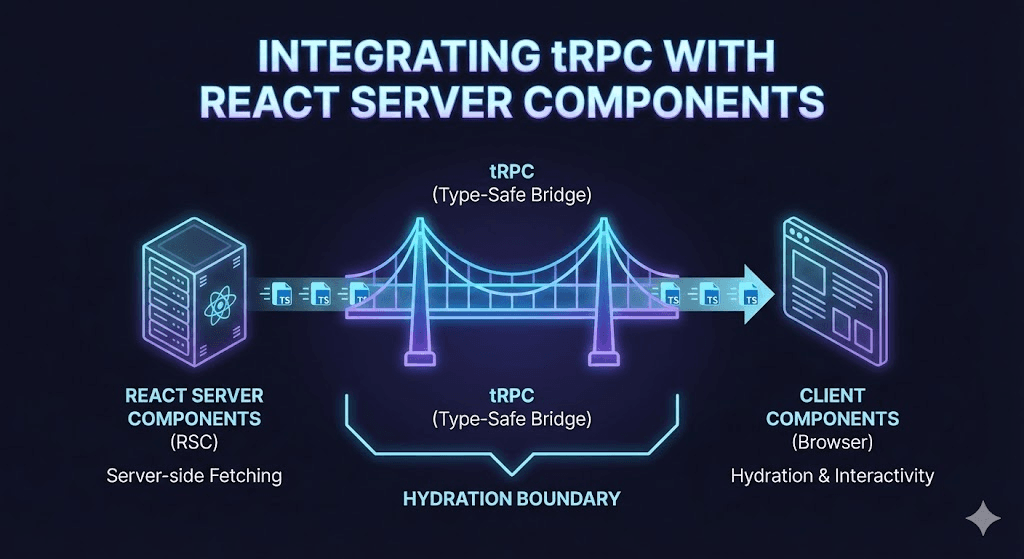
Introduction: The Convergence of Type Safety and Server Rendering
The landscape of modern web development has shifted dramatically with the introduction of React Server Components (RSC). While RSCs natively solve many problems related to data fetching and bundle size, the need for a unified, type-safe API layer remains critical for complex applications. tRPC v11 has evolved to bridge this gap, moving towards a "Query-native" integration that aligns perfectly with the Next.js App Router architecture.
Integrating tRPC with RSCs allows developers to retain the "Move Fast and Break Nothing" philosophy—ensuring that changes on the backend immediately propagate type errors to the frontend—while leveraging the performance benefits of server-side streaming and hydration. This guide serves as an exhaustive technical blueprint for implementing this architecture.
Part 1: Architectural Foundations and Prerequisites
Successfully integrating tRPC with RSC requires understanding the distinct roles of the client and server in the Next.js App Router. Unlike the traditional pages directory, the App Router separates components into "Client Components" (interactive, browser-side) and "Server Components" (static, server-side).
To proceed, ensure the development environment meets the following criteria:
- Framework: Next.js 14 or later (App Router enabled).
- Language: TypeScript 5.7.2+ with "strict" mode enabled.
- tRPC Version: v11 (required for native RSC and React Query integration).
Step 1: dependency Installation
The foundation begins with installing the core tRPC packages along with TanStack Query. The inclusion of client-only and server-only packages is vital for preventing leakage of sensitive server code into the client bundle.
npm install @trpc/server @trpc/client @trpc/tanstack-react-query @tanstack/react-query@latest zod client-only server-onlyPart 2: The Backend Router Foundation
The backend setup in tRPC v11 remains familiar but requires specific adjustments for the Next.js App Router context. The initialization logic must handle the creation of context and the definition of the router structure.
Context Creation and Initialization
The context object is the conduit for passing request-specific data, such as authentication headers or database connections, to your procedures. In the RSC environment, using React's cache function is recommended to ensure the context is created once per request, preventing redundant overhead.
File:trpc/init.ts
import { initTRPC } from '@trpc/server';
import { cache } from 'react';

// Create context with React cache to deduplicate requests
export const createTRPCContext = cache(async () => {
  return { userId: 'user_123' }; // Example context data
});

const t = initTRPC.create({
  // Optional: Data transformer (e.g., SuperJSON)
  // transformer: superjson,
});

// Export reusable router and procedure helpers
export const createTRPCRouter = t.router;
export const createCallerFactory = t.createCallerFactory;
export const baseProcedure = t.procedure;
Defining the App Router
The router acts as the central directory for all API procedures. Best practices dictate splitting the router into sub-routers (e.g., postRouter, userRouter) to maintain a manageable codebase, then merging them into a root appRouter.
File: trpc/routers/_app.ts
import { z } from 'zod';
import { baseProcedure, createTRPCRouter } from '../init';

export const appRouter = createTRPCRouter({
  hello: baseProcedure
    .input(z.object({ text: z.string() }))
    .query((opts) => {
      return { greeting: `hello ${opts.input.text}` };
    }),
});

// Export type definition of API ONLY (not the runtime router)
export type AppRouter = typeof appRouter;
The API Route Handler
Next.js requires an API route to handle incoming HTTP requests from the client. This uses the standard fetchRequestHandler adapter.
File: app/api/trpc/[trpc]/route.ts
import { fetchRequestHandler } from '@trpc/server/adapters/fetch';
import { createTRPCContext } from '~/trpc/init';
import { appRouter } from '~/trpc/routers/_app';

const handler = (req: Request) =>
  fetchRequestHandler({
    endpoint: '/api/trpc',
    req,
    router: appRouter,
    createContext: createTRPCContext,
  });

export { handler as GET, handler as POST };
Part 3: The Hydration Strategy (The "Hub" of RSC)
The most complex aspect of integrating tRPC with RSC is managing the "Hydration Boundary." Data fetched on the server (RSC) needs to be passed to the client without re-fetching. This requires a specialized Query Client configuration.
The Query Client Factory
A shared factory function is necessary to create QueryClient instances. This function must handle the distinct lifecycles of the server (where a new client is needed for every request) and the browser (where a singleton client is preferred).
Crucially, the shouldDehydrateQuery option must be configured to include pending queries. This allows the server to start fetching data and stream the promise to the client, a technique known as "streamed hydration".
File: trpc/query-client.ts
import { defaultShouldDehydrateQuery, QueryClient } from '@tanstack/react-query';
import superjson from 'superjson';

export function makeQueryClient() {
  return new QueryClient({
    defaultOptions: {
      queries: {
        staleTime: 30 * 1000, // Avoid immediate refetch on client
      },
      dehydrate: {
        // serializeData: superjson.serialize, // Enable if using SuperJSON
        shouldDehydrateQuery: (query) =>
          defaultShouldDehydrateQuery(query) || query.state.status === 'pending',
      },
      hydrate: {
        // deserializeData: superjson.deserialize, // Enable if using SuperJSON
      },
    },
  });
}
Part 4: Client-Side Integration
Client Components require a standard tRPC provider setup. This TRPCProvider wraps the application and enables the use of useQuery and useMutation hooks within interactive components.
File: trpc/client.tsx
'use client'; // Required for Client Components

import { QueryClient, QueryClientProvider } from '@tanstack/react-query';
import { createTRPCClient, httpBatchLink } from '@trpc/client';
import { createTRPCContext } from '@trpc/tanstack-react-query';
import { useState } from 'react';
import { makeQueryClient } from './query-client';
import type { AppRouter } from './routers/_app';

export const { TRPCProvider, useTRPC } = createTRPCContext<AppRouter>();

let browserQueryClient: QueryClient;

function getQueryClient() {
  if (typeof window === 'undefined') {
    // Server: always make a new query client
    return makeQueryClient();
  }
  // Browser: make a new query client if we don't already have one
  if (!browserQueryClient) browserQueryClient = makeQueryClient();
  return browserQueryClient;
}

function getUrl() {
  const base = (() => {
    if (typeof window !== 'undefined') return '';
    if (process.env.VERCEL_URL) return `https://${process.env.VERCEL_URL}`;
    return 'http://localhost:3000';
  })();
  return `${base}/api/trpc`;
}

export function TRPCReactProvider(props: Readonly<{ children: React.ReactNode }>) {
  const queryClient = getQueryClient();
  const [trpcClient] = useState(() =>
    createTRPCClient<AppRouter>({
      links: [
        httpBatchLink({
          url: getUrl(),
          // transformer: superjson, // Enable if using SuperJSON
        }),
      ],
    }),
  );

  return (
    <QueryClientProvider client={queryClient}>
      <TRPCProvider trpcClient={trpcClient} queryClient={queryClient}>
        {props.children}
      </TRPCProvider>
    </QueryClientProvider>
  );
}
Part 5: Server-Side Prefetching and Hydration
This section details the critical "bridge" that allows Server Components to fetch data and pass it to Client Components. This is achieved by creating a "Caller" or "Proxy" that runs on the server.
File: trpc/server.tsx
import 'server-only'; // Prevent client-side import
import { createTRPCOptionsProxy } from '@trpc/tanstack-react-query';
import { cache } from 'react';
import { createTRPCContext } from './init';
import { makeQueryClient } from './query-client';
import { appRouter } from './routers/_app';

// Stable getter for the query client per request
export const getQueryClient = cache(makeQueryClient);

export const trpc = createTRPCOptionsProxy({
  ctx: createTRPCContext,
  router: appRouter,
  queryClient: getQueryClient,
});
The "Render as You Fetch" Pattern
In the App Router (app/page.tsx), data is prefetched on the server. The HydrationBoundary component then serializes this state and sends it to the client. This approach optimizes "Time to First Byte" (TTFB) because the request fires immediately on the server.
File: app/page.tsx
import { dehydrate, HydrationBoundary } from '@tanstack/react-query';
import { getQueryClient, trpc } from '~/trpc/server';
import { ClientGreeting } from './client-greeting';

export default async function Home() {
  const queryClient = getQueryClient();

  // Prefetching: Starts the request but doesn't block rendering
  void queryClient.prefetchQuery(
    trpc.hello.queryOptions({ text: 'world' })
  );

  return (
    <HydrationBoundary state={dehydrate(queryClient)}>
      <ClientGreeting />
    </HydrationBoundary>
  );
}File:app/client-greeting.tsx (Client Component)
'use client';
import { useSuspenseQuery } from '@tanstack/react-query';
import { useTRPC } from '~/trpc/client';

export function ClientGreeting() {
  const trpc = useTRPC();
  // Data is immediately available from the cache
  const { data } = useSuspenseQuery(trpc.hello.queryOptions({ text: 'world' }));

  return <div>{data.greeting}</div>;
}
Part 6: Advanced Implementation Strategies
1. Reusable Hydration Helpers
To reduce boilerplate in page.tsx files, it is highly recommended to create helper functions. A prefetch helper and a HydrateClient wrapper can streamline the developer experience.
// trpc/server.tsx additions
import { dehydrate, HydrationBoundary } from '@tanstack/react-query';

export function HydrateClient(props: { children: React.ReactNode }) {
  const queryClient = getQueryClient();
  return (
    <HydrationBoundary state={dehydrate(queryClient)}>
      {props.children}
    </HydrationBoundary>
  );
}

export function prefetch<T>(queryOptions: T) {
  const queryClient = getQueryClient();
  if (queryOptions.queryKey[1]?.type === 'infinite') {
    void queryClient.prefetchInfiniteQuery(queryOptions as any);
  } else {
    void queryClient.prefetchQuery(queryOptions);
  }
}
2. Direct Server Callers (Avoiding HTTP)
For scenarios where data is needed only on the server (e.g., generating metadata or static generation), invoking the router directly is more efficient than going through the HTTP layer. This method creates a "caller" that executes the procedure logic directly as a function call.
// trpc/server.tsx
export const caller = appRouter.createCaller(createTRPCContext);

// Usage in app/page.tsx
const greeting = await caller.hello({ text: 'server' });
Warning: Data fetched this way is not hydrated to the client cache. It is strictly for server-side consumption.
3. Suspense and Error Boundaries
Integrating React Suspense allows for granular loading states. By using useSuspenseQuery in the client component and wrapping it with <Suspense> in the server component, the application can show a fallback UI while the streamed data resolves.
// app/page.tsx
import { Suspense } from 'react';
import { ErrorBoundary } from 'react-error-boundary';

export default async function Home() {
  prefetch(trpc.hello.queryOptions({ text: 'world' }));

  return (
    <HydrateClient>
      <ErrorBoundary fallback={<div>Something went wrong</div>}>
        <Suspense fallback={<div>Loading...</div>}>
          <ClientGreeting />
        </Suspense>
      </ErrorBoundary>
    </HydrateClient>
  );
}
The Bottom Line: The Future of Full-Stack Type Safety
Integrating tRPC with React Server Components represents the pinnacle of modern Next.js architecture. It combines the raw performance of server-side data fetching with the unparalleled developer experience of end-to-end type safety. By following the hydration patterns outlined in this guide—specifically the use of prefetchQuery and HydrationBoundary—developers can build applications that are both highly performant and incredibly robust.